iPhone & iPad
Available on the App Store
Tasks, a calendar and Xiao Shi, plus Home Screen widgets and Lock Screen countdowns.
Get it on the App StoreAI TASKS · CALENDAR · REMINDERS
Speak it, snap it or type it. TimeMind organizes your tasks and reminders. You decide when to do them.
Start adding tasks. No sign-up needed.
Design team sync tomorrow at 3pm, remind me ten minutes before
Capture first, plan later. Tasks without a date stay unscheduled until you choose a time.
Screens show iOS 1.3.0; Android system interfaces look slightly different. Android 1.3.0 is available in the download section.
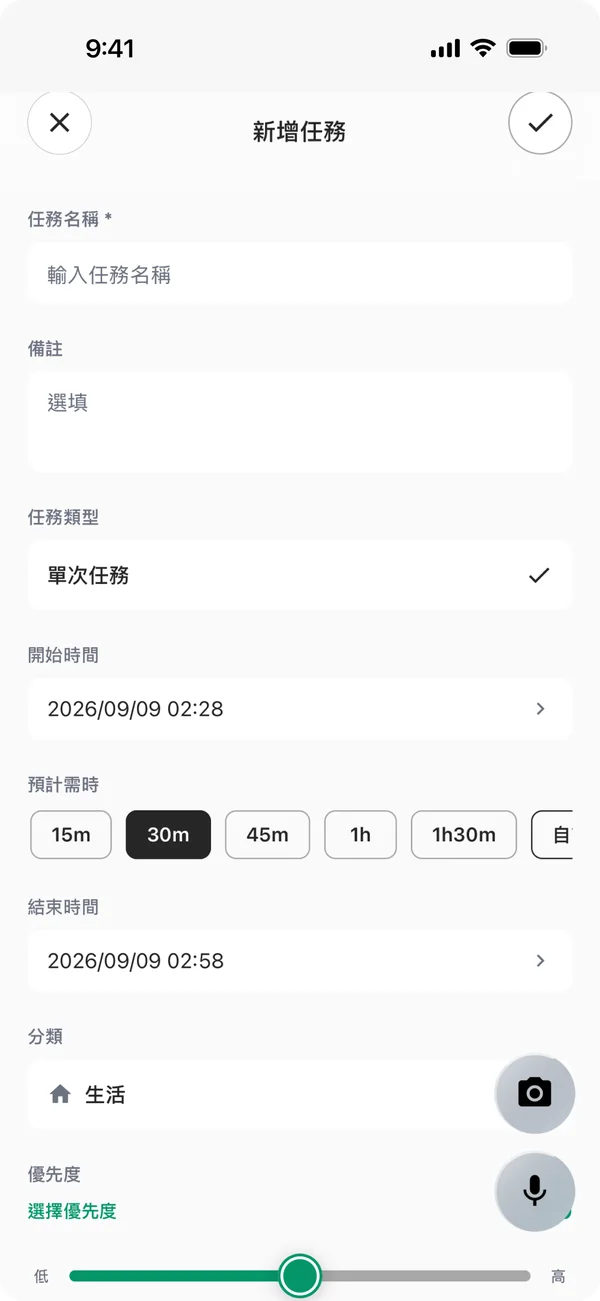
Tap the mic and say it, snap a poster or screenshot, or fill in the form. Set start and end times, duration, reminders, category and priority.
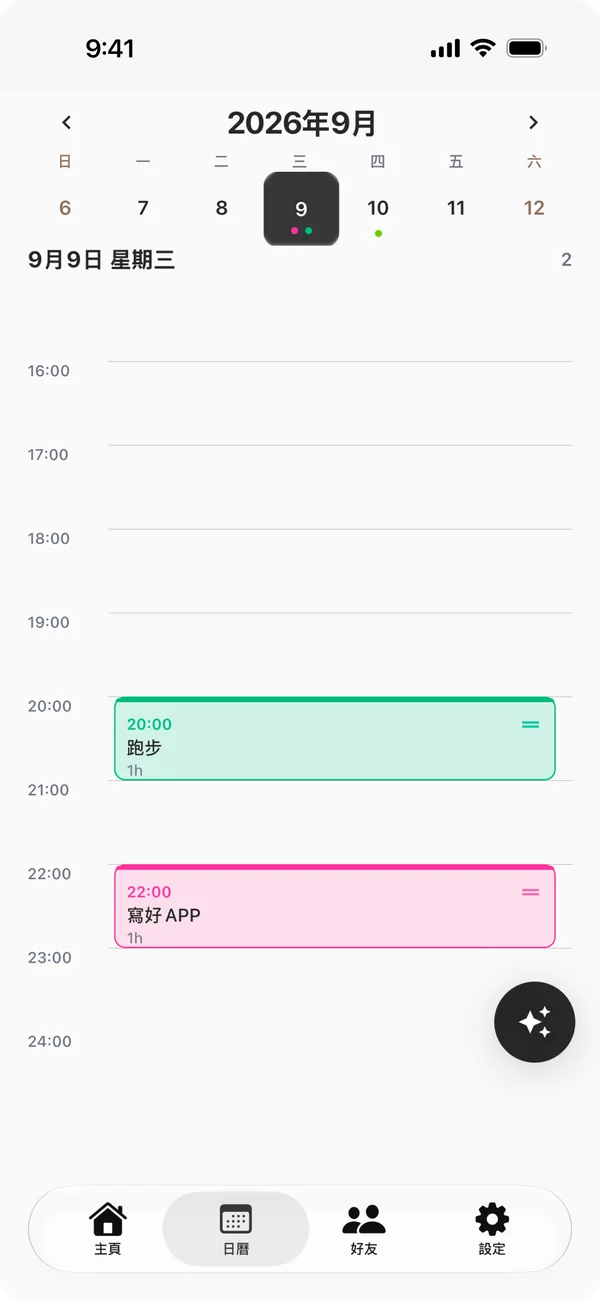
See your whole day on the day and week timelines. Drag a task to reschedule it, and sync both ways with Apple Calendar on iPhone or your phone’s calendar on Android.
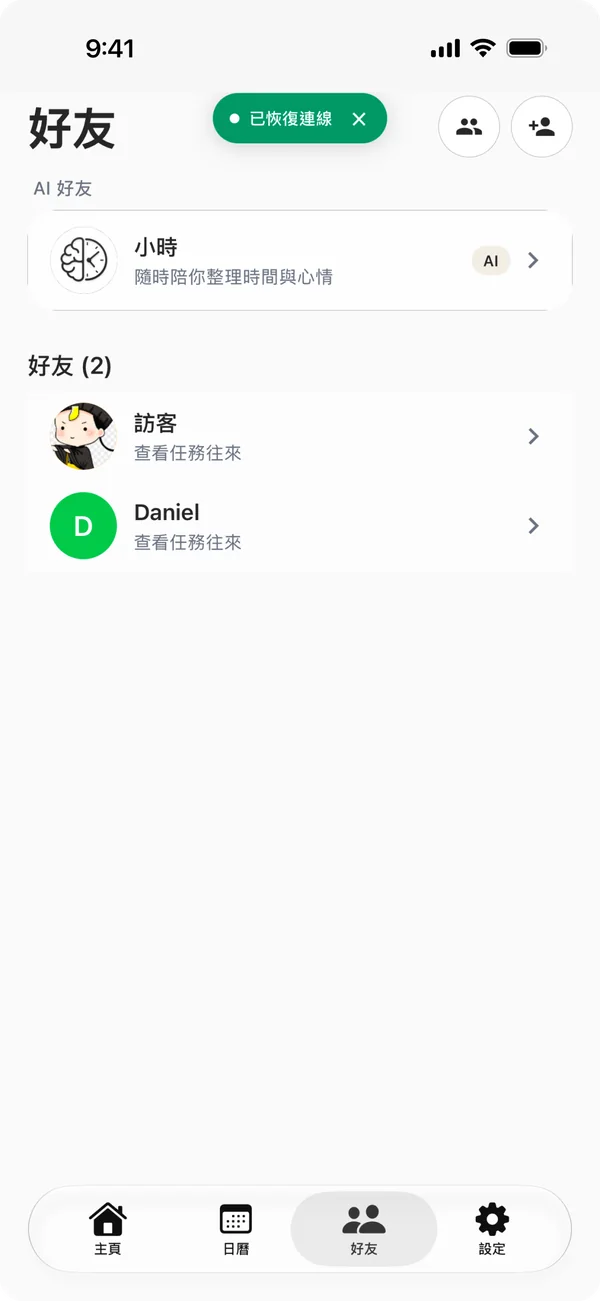
Share a task with a friend and get notified when they finish it. You can nudge them too.
New in 1.3.0
TimeMind 1.3.0 gives our AI friend Xiao Shi a mascot, and redesigns the Dynamic Island, Lock Screen and Home Screen widgets.
The video illustrates the iPhone design. The app may look slightly different.
Xiao Shi is the AI friend inside TimeMind. It can see today’s tasks, chats when you want to chat, and helps you pick the easiest one to start when you’re stuck.
 Xiao ShiAI friend
So tired today. I don’t feel like doing anything.
Then start with the smallest one. Reply to Mark’s email? That’s five minutes.
OK, doing that first
Tell me when it’s done, and we’ll plan the rest later.
You can use TimeMind without an account. Content leaves your device only for AI or sync, and only after you agree or turn it on.
Stored in the app’s sandbox, never on our servers.
You can turn off each one or withdraw consent in Settings.
| FreeFree forever | ProSubscription or one-time purchase | |
|---|---|---|
| Tasks, reminders, calendar and recurring tasks | Everything | Everything |
| Voice task creation | 50 a month | 1,000 a month |
| Photo analysis | 5 a month | 100 a month |
| Cloud sync | Not included | Included |
Counts reset on the 1st of each month and don’t roll over. On iPhone and iPad, regional prices are shown on the App Store, where you can cancel a subscription any time. If you choose Paddle checkout in the Android website version, weekly, monthly and yearly plans renew automatically and can be canceled in subscription management. Lifetime is a one-time purchase. WeChat redeem codes are still one-time purchases without automatic renewal.
Buy earlier for the lower price. These CNY lifetime prices apply to the mainland China App Store and the Android website version. All dates include the last day and use UTC+8.
Prices rise on the dates above. From January 1, 2027 (UTC+8), lifetime will no longer be available to buy in any region. Existing lifetime access stays active. Other iOS regional prices are shown in the App Store; confirm the amount before buying.
Available payment methods are shown in the app and checkout. Paddle applies regional currencies and taxes; confirm the total before paying. Canceling renewal keeps access through the paid period. See the refund policy.
No. You can start right away in guest mode — your tasks stay on this device. If you sign in or create an account later, your guest tasks move to that account. Subscribe to Pro and turn on cloud sync to get your tasks back on a new phone.
Voice input uses Apple’s on-device speech recognition. Supported languages depend on your iOS version and device and include Chinese (Mandarin, Cantonese), English, Japanese, Korean, Spanish, French, German, and many more. On Android, TimeMind uses your phone’s speech recognition service, so supported languages depend on your phone. In Settings → Voice & AI Language, choose the recognition language and the language AI uses to write your tasks.
A one-time task happens once, with its own date and deadline. A recurring task repeats on the rule you choose — daily, weekly (on the days you pick), monthly, or yearly — with a reminder each time. When you edit or delete a recurring task, you can apply the change to just that one, this and future ones, or all of them.
At the bottom of Settings, tap “Delete Account & Data”. Once you confirm, your account, cloud data, and the data on this device are deleted; for accounts that use Sign in with Apple, TimeMind’s access is revoked too. Deleting your account doesn’t cancel subscriptions — first cancel in your App Store subscriptions or in the Paddle customer portal linked from your subscription confirmation email. Pro from an Android redeem code is tied to your account, so any remaining time is lost and can’t be transferred when you delete the account.
START ON YOUR DEVICE
Choose your platform. Download TimeMind free.
Available on the App Store
Tasks, a calendar and Xiao Shi, plus Home Screen widgets and Lock Screen countdowns.
Get it on the App StoreDownload the APK from this site
Download the installer and start adding tasks, with Home Screen widgets, countdown notifications and calendar sync. Not yet on Google Play.
Download Android APKOpen this page in your browser
WeChat, QQ and the Baidu app can’t download or install APK files. Tap “···” in the top-right corner and choose “Open in browser”, then download.
Includes the latest registration and sign-in fixes from the first launch, with no need to wait for an online update.
Download the installer from this site
Organize tasks, calendars and goals at your desk, with Xiao Shi and phone cloud sync. First public release; see the feature page for verification status.
Download Windows installer Features and installation helpAndroid 1.3.0 includes Home Screen widgets, countdown notifications, two-way calendar sync, app icon shortcuts, WeChat payments and Pro redeem codes.
Android uses your phone’s speech service first; that service determines whether it connects to the internet. We ask for your consent before using Tencent Cloud as a fallback.
Current APK: 1.3.0 (18) · Published · 80,290,818 bytes
SHA-256: d93d10b9095a3977338ec47e29efbef93a7e4b5f383d3ca69da6f5475f0efa0d